
Face verification is the final hurdle between completing your Poppo Live host registration and actually going live. It’s a required step for all hosts, no verification means no streaming and no withdrawals. The good news is it doesn’t take long. This guide covers everything you need to know, from how to complete the process to what to do if something goes wrong.
How Face Verification Works on Poppo Live
Step 1: Navigate to the Verification Section
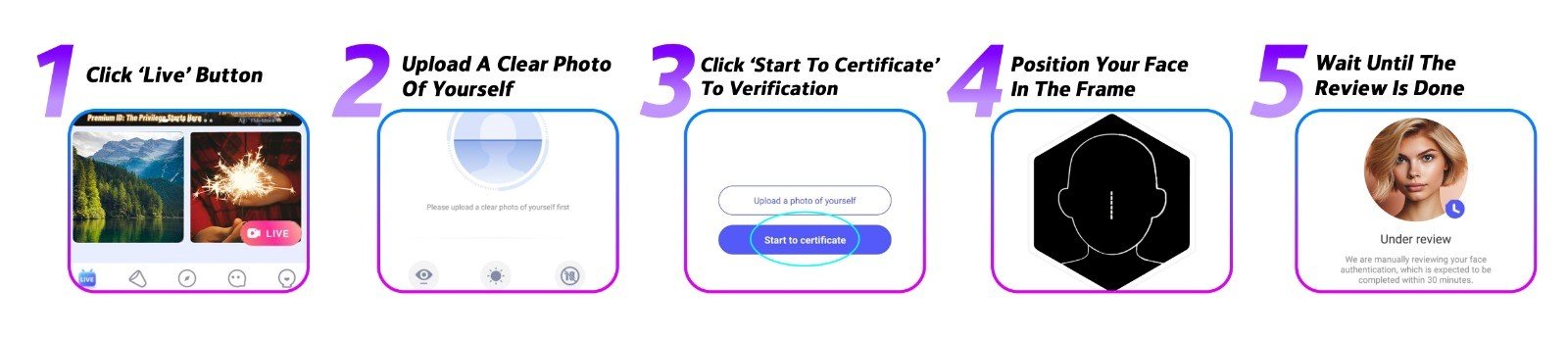
Open the Poppo Live app and go to the homepage. Tap the ‘Live’ button — this takes you straight into the face verification flow.
Step 2: Upload a Photo of Yourself
You’ll need to provide a recent, well-lit photo where your face is clearly visible. Confirm it once you’re satisfied, and you’ll move to the next stage.
Step 3: Begin the Live Verification
Tap ‘Start to Certificate’ to enter the real-time verification stage. Make sure your surroundings are well-lit before proceeding.
Step 4: Go Through the On-Screen Instructions
The app leads you through the process step by step. To make it go smoothly: choose a room with good lighting and no bright source behind you, take off anything covering your face such as glasses, hats, or masks, and stick to your front-facing camera.
Step 5: Submit and Check Back for Results
Once you’ve gone through all the steps, submit your verification. Reviews typically take one to three business days, though many come back much sooner. An approved result means you’re verified and ready to stream. A failed result just means you can try again.
Face Verification Problems & How to Fix Them
- Camera access is blocked
Check your phone’s app permissions to make sure Poppo Live is allowed to use the camera. Also confirm you’re on the latest version of the app. If problems persist, try restarting or switching devices. - Verification is taking longer than expected
Most cases are resolved quickly, but manual reviews can take up to three business days. If you’ve passed that window, get in touch with our support team for a status update. - Verification was rejected
The most common causes are a mismatch between the video and your profile photo, or another person appearing in the frame. Revisit your profile photo and run through the verification again.
Poppo Live Face Verification FAQs
- Can I skip face verification?
Technically yes, but it blocks you from going live or withdrawing any earnings. Every Poppo Live host must complete it before using the platform’s key features. - What if I make a mistake during the video steps?
No issue at all, the verification process can be redone as many times as you need without any consequence. - Why does Poppo Live request re-verification occasionally?
It’s a built-in security measure designed to keep accounts protected. Just complete the check when asked and your account will stay in good standing. - I keep getting rejected, what should I do?
You can attempt verification multiple times each day. After hitting the daily cap, wait 24 hours before trying again. If the problem continues, contact our support team directly and they’ll help you figure it out.
Get it Sooner than Later
Think of face verification as the key that unlocks everything Poppo Live has to offer, without it, your ability to stream and earn is on hold. Getting it done sooner rather than later means you can hit the ground running. This guide has walked you through every step, so you’re fully prepared. Need more help? Visit our blog or reach out to our team anytime.