
Every successful Poppo Live agent knows that host recruitment is the cornerstone of their earnings. The size and activity of your team determines your commissions, so being able to invite hosts efficiently is a skill worth mastering early. The process to invite new hosts as agent is straightforward, here’s a complete walkthrough to get you started.
How to Invite New Host as Agent
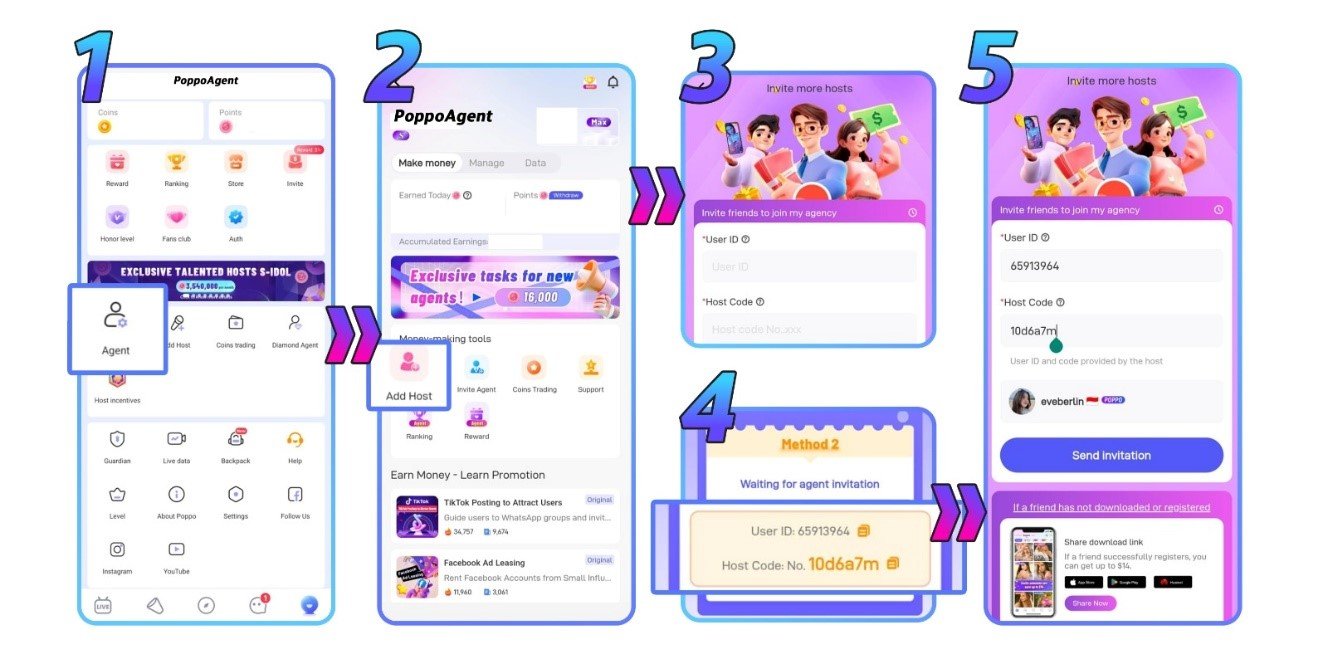
Step 1: Find the ‘Agent’ Menu
Open your profile and look for the ‘Agent’ menu in the center of the screen. Tap it to enter the agent dashboard.
Step 2: Press ‘Add Host’
From inside the ‘Agent’ menu, tap the ‘Add Host’ button at the center of the screen to begin the invitation process.
Step 3: Enter the Host’s ID and Code
Contact the host ahead of time to get their ID and unique code. Once you have both, fill them into the corresponding fields.
Step 4: Host’s ID and Code Examples
In the image below you can check how host’s ID and code looks like on the host’s end.
Step 5: Tap ‘Send Invitation’
With the details filled in, tap the ‘Send Invitation’ button to deliver your invite directly to the host.
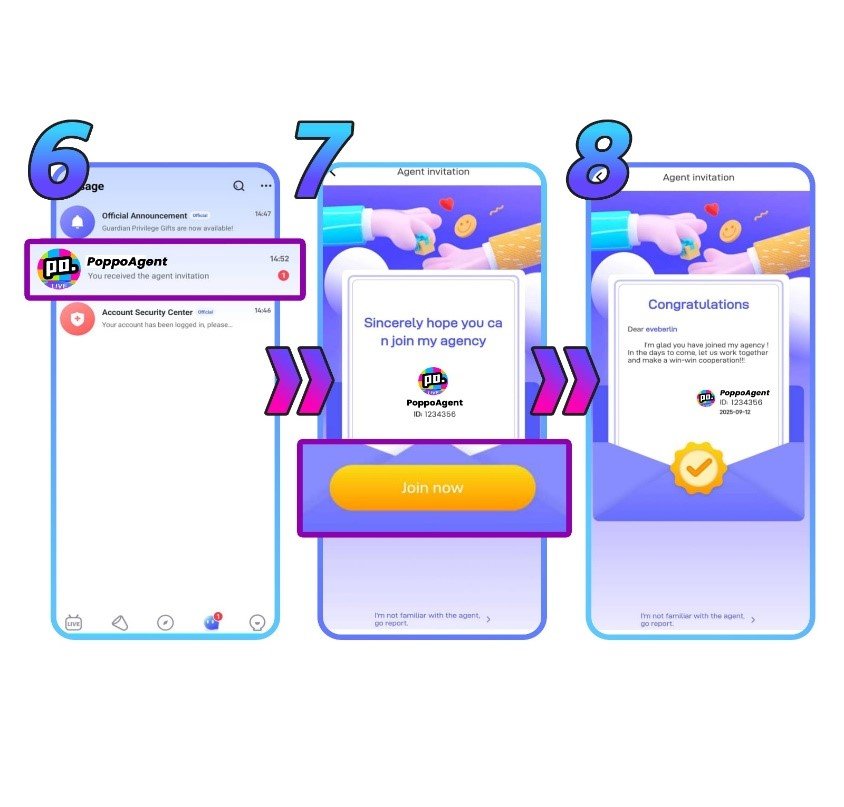
Step 6: Invitation Is Delivered
The host will see your invitation as a notification and message inside their Poppo Live app.
Step 7: Host Makes Their Decision
The host will review your invitation and choose to accept or decline — it’s completely up to them.
Step 8: A New Team Member Joins
If they accept, they’re now officially part of your agency and you can begin building your collaboration on Poppo Live.
Troubleshooting Host Invitation Issues
- My invitation went through but the host couldn’t join
This is almost always tied to one of two things: a mistake in the host’s ID or code, or the host already belonging to another agency. Double-check the information and try again. - I want to invite someone who’s already in an agency
You’ll need to be patient here. Until the host has officially departed from their existing agency, you won’t be able to bring them into yours.
Invite New Host as Agent FAQs
- What performance requirements do agents have?
Agents are expected to maintain both recruitment momentum and team activity. If your full roster of hosts and sub-agents sits idle for an entire month, Poppo Live may close your agency and shift everyone to its official agency. Because these expectations can be revised, check in with our team to get the most current information. - I don’t have the host’s ID or code, what now?
Neither field can be left blank. Reach out to the host and ask them for both pieces of information before attempting to send an invitation.
Keep Recruiting and Stay Consistent
Growing your Poppo Live agency starts with building the right team, and now you know exactly how the process to invite new hosts as agent. Every active host you bring on board brings you closer to your earning goals, so keep recruiting and stay consistent. Have questions about inviting hosts or anything else about being a Poppo Live agent? Our team is always happy to hear from you. Visit our blog anytime for more helpful resources.