
You’ve put the work in on Poppo Live — now it’s time to get paid. This Poppo Live withdrawal guide is your one-stop resource for everything related to withdrawals on the platform. We cover the prerequisites, a clear step-by-step walkthrough, answers to the most frequently asked questions, and practical fixes for the problems hosts and agents encounter most often.
Poppo Live Withdrawal Requirements
Face Verification. Required for both hosts and agents before any withdrawal can be processed. Hosts complete it before going live; agents complete it before their first payout. Refer to our face verification guide if needed.
Confirmed Email or Phone Number. Your account must have a verified email or phone number linked to it. Check this in your profile before moving on.
$10 USD Minimum Balance. Withdrawals are only available once your balance reaches the $10 minimum. Make sure you’re there before starting.
Valid Payment Account. You’ll need an active bank account or e-wallet to receive your payout. Supported options are covered later in this guide.
Poppo Live Withdrawal — Step by Step
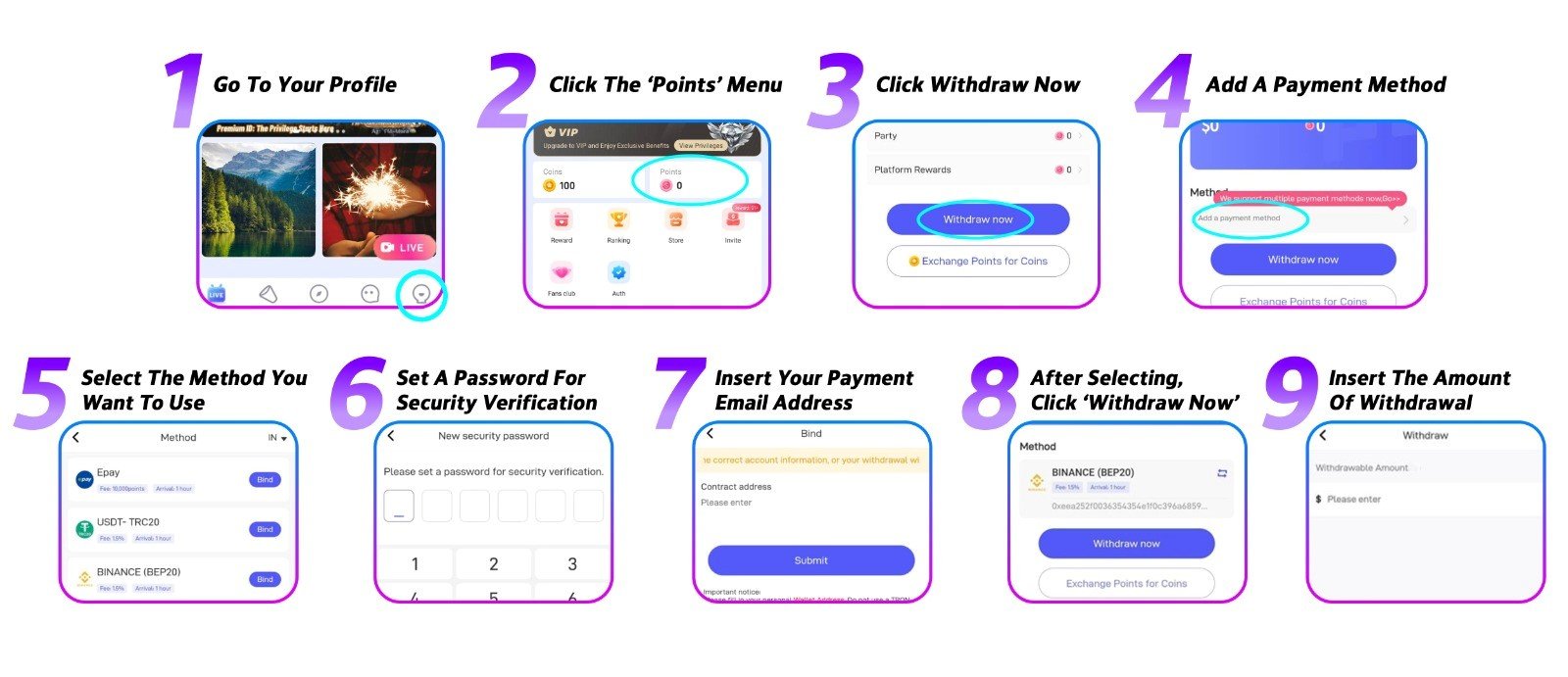
Step 1: Head to Your Profile
Open Poppo Live and navigate to your profile page.
Step 2: Open the ‘Points’ Menu
Tap ‘Points’ in your profile to access your earnings overview.
Step 3: Press ‘Withdraw Now’
Your available balance will be shown here. Tap ‘Withdraw Now’ to proceed.
Step 4: Add Your Payment Method
If you’re withdrawing for the first time, tap ‘Add a Payment Method’ to register one before continuing.
Step 5: Select a Payment Method
Poppo Live supports Epay, USDT, PayPal, bank transfer, and e-wallet. Availability depends on your location.
Step 6: Create a Transaction PIN
Set up a secure PIN that will be required each time you withdraw. Avoid predictable combinations to keep your funds safe.
Step 7: Link Your Payout Email
Enter the email connected to your payment account to bind it to your Poppo Live profile.
Step 8: Return to ‘Points’ and Tap ‘Withdraw Now’
Now that your payment method is in place, go back to the ‘Points’ menu and tap ‘Withdraw Now’ again.
Step 9: Enter Your Amount and Submit
Fill in your desired withdrawal amount and confirm. Funds are typically delivered within 72 hours.
Frequently Asked Questions
- What is the withdrawal minimum?
The floor is $10 USD, and all amounts must be in multiples of 10, for example $10, $20, $50, or $200. - What payment methods can I use?
Epay, USDT, PayPal, bank transfer, and e-wallet are all supported. Available options depend on your country, open the app to see what’s available in your region. - Do I pay any fees when withdrawing?
Fees vary by payment provider. Some third-party services charge for transfers, and the rates aren’t the same across all of them. Confirm your provider’s fees before you withdraw. - Can a host withdraw on their own?
Yes, hosts have complete autonomy over their withdrawals and can request one at any time their balance qualifies. - Wrong payment account linked, what do I do?
Simply unlink it and add the correct one. There are no restrictions on updating your payment details on Poppo Live.
Common Withdrawal Issues & Fixes
- Withdrawal failed to process
The most common causes are incorrect payment details, a suspended or inactive account, or a restricted payment method. Try an alternative method and contact our support team if you need further help. - No withdraw button visible
This signals an unmet requirement. Work through the checklist: face verification complete, contact details verified, balance at or above $10 USD. - Payment method not appearing
Certain methods are only available in select regions. Choose from the options currently showing for your location. - Withdrawal still pending
Normal processing takes up to three business days. If you’ve gone beyond that window, reach out to our support team for an update.
Getting Paid Doesn’t Have to Be Complicated
Getting paid on Poppo Live doesn’t have to be complicated. With your requirements met and your payment method properly set up, the whole process takes just a few taps. Hosts and agents both benefit from making sure their account details are accurate before confirming any withdrawal. Questions or concerns? Our support team is always available, and our blog has plenty of guides to help you make the most of your time on the platform.