
Become a Poppo Live Agent & Start Your Agency
Become a Poppo Live Agent and start your own Poppo Live Agency — recruit hosts, manage your team, and earn commission from agency performance.
This page covers registration, requirements, and how Poppo Agent and Poppo Agency earnings work. See the agent registration guide for step-by-step details.
What Is a Poppo Live Agency?
A Poppo Live Agency is the team you build and manage as a Poppo Live Agent — recruit hosts, guide performance, and earn commission from agency activity.
- Invite New Hosts & Sub-agents
- Mentor Your Team
- Join Seasonal Agency Events
How to Become a Poppo Live Agent
Follow these seven steps to complete agency registration. For screenshots and troubleshooting, see our Poppo Live agent registration guide.
-
1
Download Poppo Live app
Download the app using our official registration link.
-
2
Create a Poppo Live account
Complete registration and sign in to your new account.
-
3
Copy your Poppo ID from the profile
Open your profile and copy your unique Poppo ID.
-
4
Click the agency registration link
Open the official agency registration page to begin setup.
-
5
Paste your Poppo ID and click Get
Enter your ID on the registration form and request a verification code.
-
6
Check your Poppo Live messages
Open the app message inbox to receive your verification code.
-
7
Enter the code and submit
Submit the verification code to create your Poppo agency.

Poppo Live Agent Requirements
Before you begin agency registration, make sure you meet these requirements. All details below are based on the current Poppo Live agent onboarding process.
- A valid Poppo Live account with your Poppo ID ready for the registration form.
- Access to the official agency registration link and an agency invitation code. Contact us if you need assistance obtaining a code.
- Ability to receive the in-app verification message during registration.
- Completion of face verification for your agent account after registration.
- Commitment to platform rules — including not recruiting hosts already in another agency, minors, or anyone with falsified information.
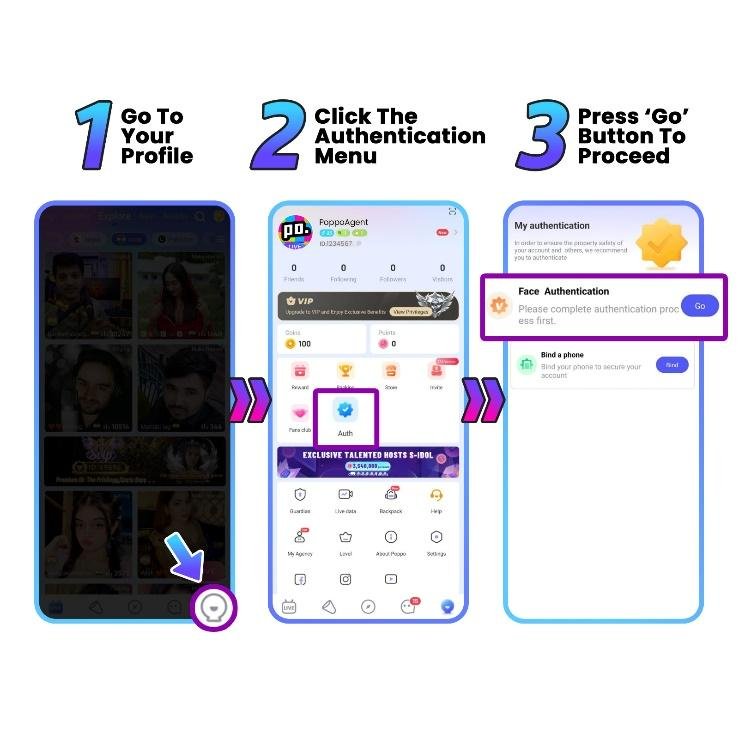
How to Set Face Verification for Agent
Face verification validates your identity within the system. See our face verification guide for additional context.
-
1
Go to your Profile
Log in with your agent account and open the Profile menu.
-
2
Tap the Authentication menu
Select the Auth icon from your profile tools grid.
-
3
Open Face Authentication
Tap Go on the Face Authentication row to begin verification.
-
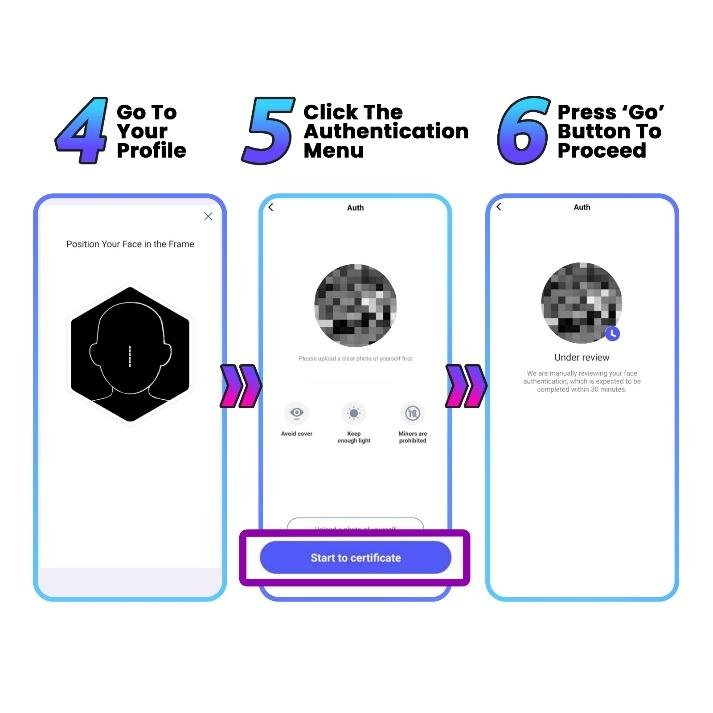
4
Upload a clear photo and start certificate
Upload a well-lit photo of yourself, then tap Start to certificate.
-
5
Follow on-screen instructions
Place your face inside the frame and complete required actions such as blink, turn head, or smile.
-
6
Wait for approval
Poppo Live will review your submission, usually within 1–3 working days. Once approved, your account is verified as an agent.
How Poppo Agency Commission Works
Agent commission is tied to your agency's recent performance. Rates apply to LIVE/PARTY activity and Call/Chat activity separately, calculated from the last 30 days of team income.
Agent Commission Rate
| Level | Points (Recent 30 days) | LIVE/PARTY Commission Rate | Call/Chat Commission Rate |
|---|---|---|---|
| D | 0 ~ 2 million | 4% | 4% |
| C | 2 ~ 10 million | 8% | 8% |
| B | 10 ~ 50 million | 12% | 12% |
| A | 50 ~ 150 million | 16% | 16% |
| S | 150 million+ | 20% | 20% |
- The commission rate is calculated based on the last 30 days' income.
- There's no restriction on how many level you can gain or lose each month.
Up to 20% Agent Commission
Earn commission from your team's live streaming, party, call, and chat activity as your agency grows.
Easy Self-Withdrawal
Withdraw your earnings directly through supported payout methods once you meet the minimum balance.
Top Agents Rewards
Compete on weekly agent rankings and unlock additional platform rewards for top performance.
How Poppo Agency Earnings Work
Agency earnings follow a clear chain: host activity drives agency performance, which determines your commission level and unlocks additional rewards. Results depend on team effort — there are no fixed income guarantees.
Host activity — When hosts under your agency go live, host parties, take calls, or chat, they generate points. This activity is the foundation of agency performance.
Agency performance — Combined team points over the last 30 days set your agency level (D through S) and corresponding commission rate.
Commission & rewards — You earn a percentage of team income at your current rate, plus optional bonuses from inviting hosts, inviting sub-agents, and weekly agent rankings.
Invite Agent Reward
The Invite Agent feature allows you to invite sub-agents and build your own agency network directly from the platform.
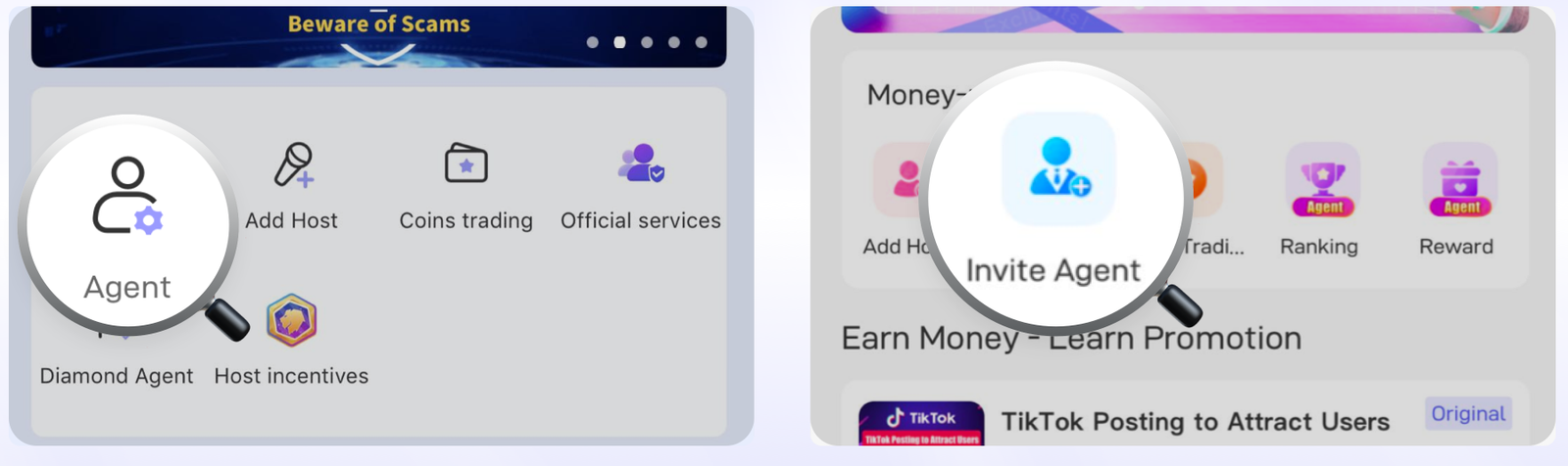
- Your sub-agent is its own individual agency. The same rules apply to them as to you.
- Only their total income will affect your commission rate and amount.
Invite Host Reward
Agents can earn extra rewards from invited hosts based on live duration, earnings points, and performance achievements.
Live Duration Reward
Newly invited hosts registered within 7 days — up to 3 hours counted per day.
| Live Duration | Points Reward |
|---|---|
| ≥ 1 hours | 10,000 |
| ≥ 5 hours | 10,000 |
| ≥ 8 hours | 10,000 |
| ≥ 12 hours | 30,000 |
Live Earnings Reward
Newly invited host's earnings reward.
| Live Earnings | Points Reward |
|---|---|
| ≥ 200,000 points | 10,000 |
| ≥ 500,000 points | 20,000 |
| ≥ 1,000,000 points | 20,000 |
| ≥ 2,000,000 points | 30,000 |
- Additionally, you will also receive bonuses once they reach certain income within 30 days.
Agent Ranking Reward Overview
Agent can check ranking information based on system performance updates.
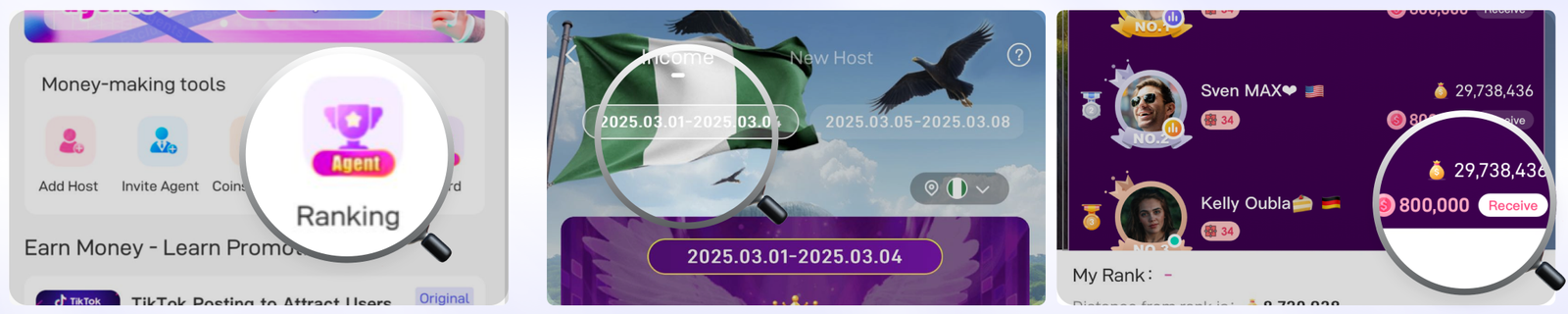
- Agent Ranking is country specific.
- Agent Ranking is calculated weekly.
Poppo Agent vs Poppo Host
Agents and hosts play different roles on Poppo Live. Understanding the difference helps you choose the right path — or guide others who want to become a Poppo Live host.
| Aspect | Poppo Agent | Poppo Host |
|---|---|---|
| Role | Build and manage a Poppo Agency | Create live content and engage viewers |
| Responsibility | Recruit hosts, mentor team, manage agency structure | Go live, host parties, connect through calls and chat |
| Earnings | Up to 20% commission from team performance | Fixed 70% gift share from live activity |
| Recruitment | Invites hosts and sub-agents into the agency | Can be recruited by an agent; may invite friends |
| Management | Agency dashboard, team tracking, ranking rewards | Personal streaming schedule and audience growth |
For host-specific registration and requirements, see the Poppo Live host registration guide.
How to Recruit Hosts for Your Poppo Agency
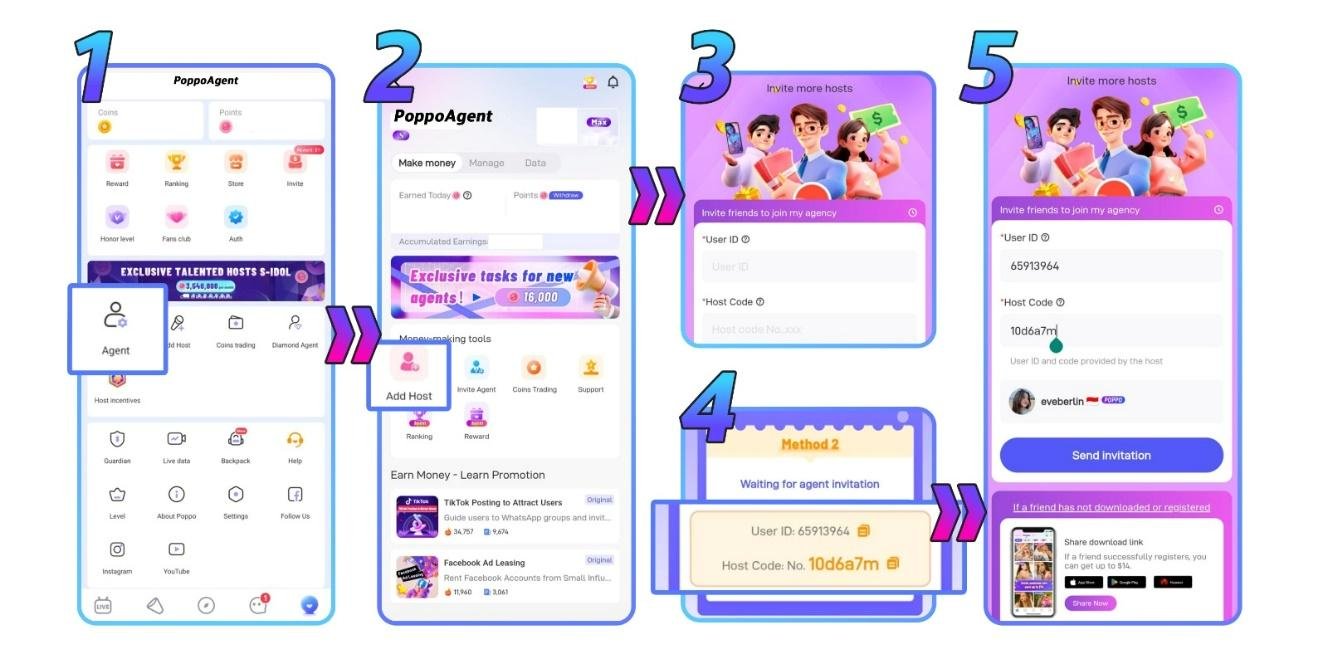
Recruiting hosts is central to agency growth. Follow the steps below or read our detailed guide on how to invite Poppo hosts.
-
1
Go to your profile and click Agent menu
Open your profile and tap the Agent option to access your agency dashboard.
-
2
Select the Add Host button
From money-making tools, tap Add Host to open the invitation form.
-
3
Get the host's ID and code
Ask the host for their User ID and Host Code before sending an invitation.
-
4
Enter host ID and invitation code
Fill in both fields on the Invite more hosts screen and verify the host profile preview.
-
5
Send invitation
Tap Send invitation after confirming the host profile is correct.
-
6
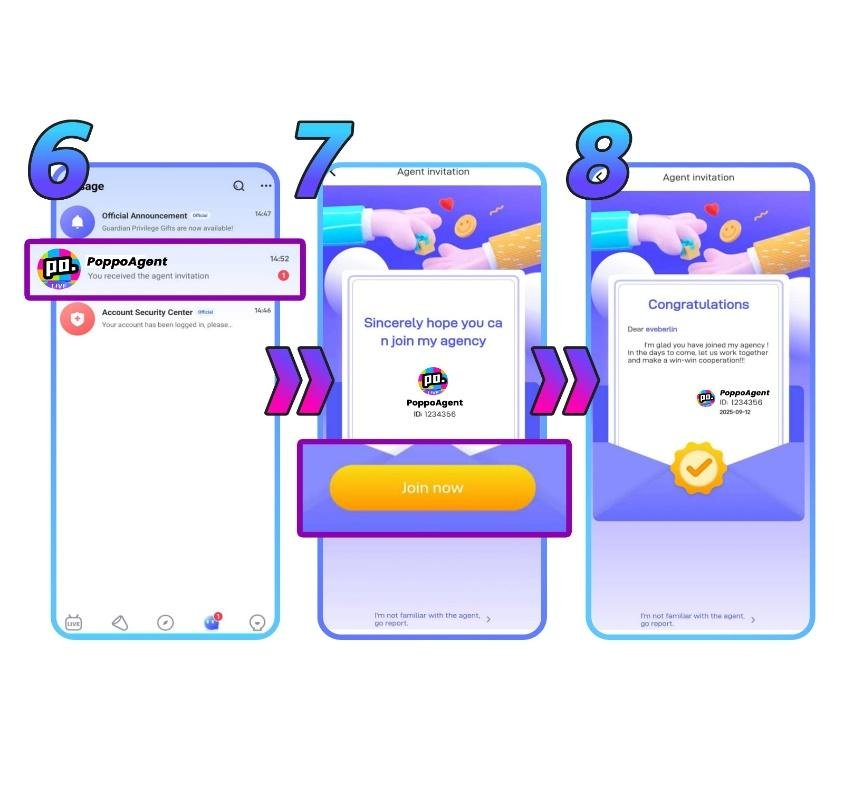
Host receives invitation message
The host will see an invitation notification inside their Poppo Live app.
-
7
Host accepts and completes verification
To join an agency, the host must accept the invitation and pass face verification.
-
8
Host is registered under your agency
Once accepted, the host is automatically added to your agency roster.
How to Invite or Manage Sub-Agents
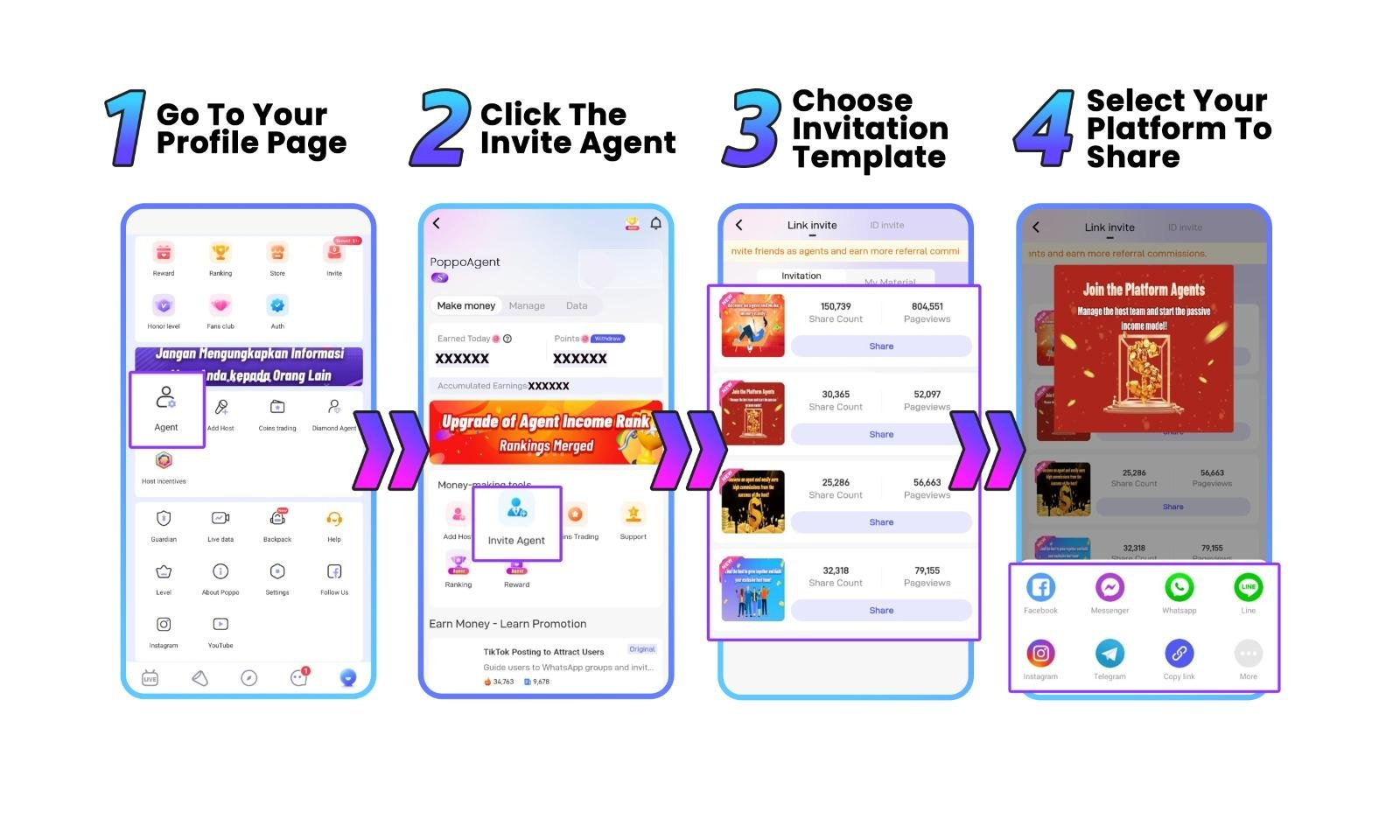
Grow your agency network by inviting sub-agents through the Agent Center and sharing your referral link. Each sub-agent operates as its own agency — only their total income affects your commission rate.
-
1
Log in to your agent account
Open Poppo Live and sign in with your registered agent account.
-
2
Go to the Agent Center menu
Navigate to Agent from your profile to open the agent dashboard.
-
3
Select the invite agent option
Tap Invite Agent from the money-making tools section.
-
4
Choose an invitation template
Pick a promotional template that fits your audience before sharing.
-
5
Share your invite link
Copy the link or share directly via Facebook, WhatsApp, Telegram, and other platforms.
Poppo Agency Rules and Responsibilities
Poppo Live Agents are responsible for managing hosts and sub-agents, maintaining activity, and complying with platform regulations. The following actions are prohibited.
- Recruiting host who's already in an agency to join their own agency
- Recruiting minor/underage hosts
- Faking host's personal information
Poppo Agent Withdrawal
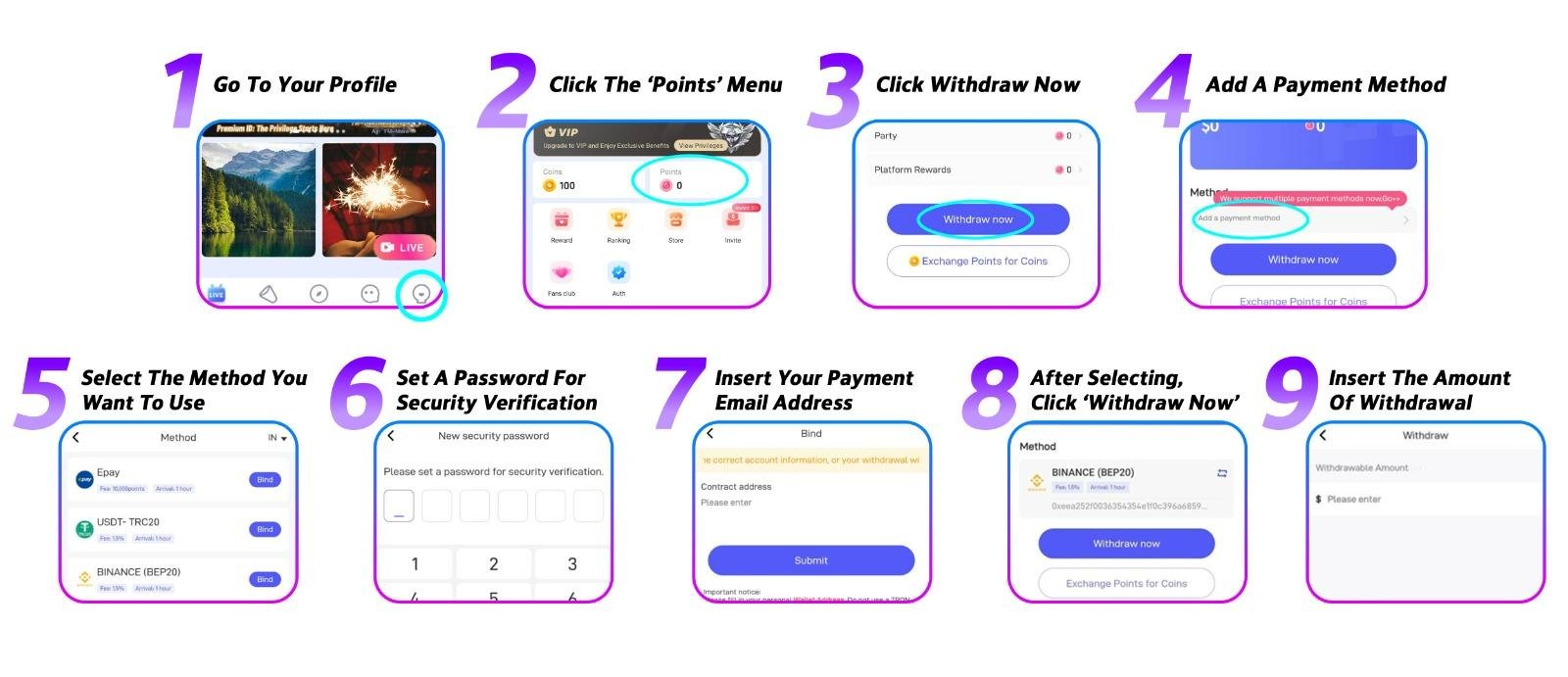
Agents can withdraw earnings after meeting the minimum balance requirement. For troubleshooting and regional details, see our Poppo Live withdrawal guide.
Poppo Live mainly supports Epay and bank transfer withdrawal methods. However, the availability may vary in each region.
-
1
Head to Your Profile
Open Poppo Live and navigate to your profile page.
-
2
Open the Points Menu
Tap Points in your profile to access your earnings overview.
-
3
Press Withdraw Now
Your available balance will be shown here. Tap Withdraw Now to proceed.
-
4
Add Your Payment Method
If you're withdrawing for the first time, tap Add a Payment Method to register one before continuing.
-
5
Select a Payment Method
Poppo Live supports Epay, USDT, PayPal, bank transfer, and e-wallet. Availability depends on your location.
-
6
Create a Transaction PIN
Set up a secure PIN that will be required each time you withdraw. Avoid predictable combinations to keep your funds safe.
-
7
Link Your Payout Email
Enter the email connected to your payment account to bind it to your Poppo Live profile.
-
8
Return to Points and Tap Withdraw Now
Now that your payment method is in place, go back to the Points menu and tap Withdraw Now again.
-
9
Enter Your Amount and Submit
Fill in your desired withdrawal amount and confirm. Funds are typically delivered within 72 hours.
Frequently Asked Questions About Poppo Live Agent & Agency
Answers to common questions about becoming a Poppo Agent, creating an agency, commission, recruitment, and withdrawals.
A Poppo Live Agent is a registered partner who builds and manages a Poppo Agency. Agents recruit hosts and sub-agents, mentor their team, and earn commission based on agency activity across live streaming, party, call, and chat.
A Poppo Live Agency is the team structure managed by an agent. It includes recruited hosts and optional sub-agents whose combined performance determines the agency's commission level and eligibility for platform rewards.
Download Poppo Live, create an account, copy your Poppo ID, open the official agency registration link, request a verification code via in-app message, and submit to create your agency. See the agent registration guide for step-by-step details.
Your Poppo Agency is created when you complete the official agent registration flow and verification. After that, use the Agent dashboard to invite hosts and sub-agents and begin building your team.
Agency registration follows the official Poppo Live process. You need a Poppo Live account and an agency invitation code to begin. Contact us if you need help obtaining a code or completing registration.
Commission is based on your agency's team income over the last 30 days. Rates range from 4% (Level D) to 20% (Level S) for both LIVE/PARTY and Call/Chat activity. There is no monthly cap on how many levels you can gain or lose.
Yes. Agents invite hosts through the Agent menu by tapping Add Host, entering the host's User ID and Host Code, and sending an invitation. The host must accept and complete face verification. Hosts already in another agency must be officially released first.
Go to Profile → Points → Withdraw Now. Bind a payment method (Epay, bank transfer, USDT, PayPal, or e-wallet depending on region), set a transaction PIN, and submit your amount. Funds are typically delivered within 72 hours. See the withdrawal guide for requirements and troubleshooting.
No. Platform rules require hosts or sub-agents to officially leave and be released by their current agency before they can accept your invitation.
Reach out to our support team via Contact Us so we can work with admins to resolve your issues through official channels.
Start Your Poppo Agency Today
Register as a Poppo Live Agent, invite hosts and sub-agents, manage your team, track performance, and earn commission based on agency results and rankings.